
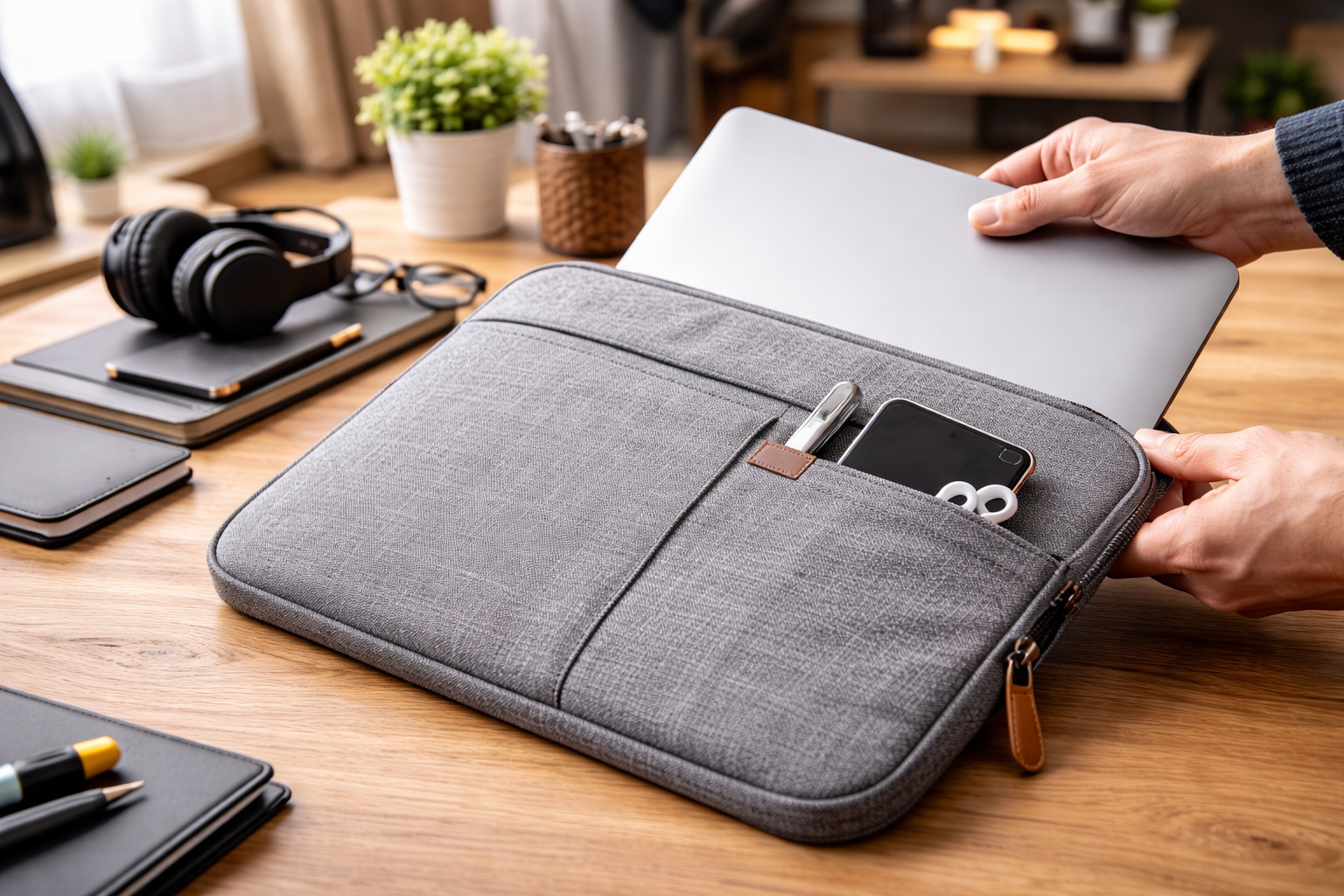
A good laptop sleeve is the cheapest insurance you’ll ever buy for your computer. Laptops get tossed into backpacks, slid across car seats, and squeezed into overhead bins — and every one of those moments is a chance for a scratch, a dent, or worse. If you’re shopping for a laptop sleeve, this guide covers everything: materials, fit, padding, styles, and what actually matters versus what’s just marketing.
What a Laptop Sleeve Actually Does (and Doesn’t Do)
Let’s set expectations. A laptop sleeve is a slim, fitted case — usually with a zipper or magnetic closure — that wraps your laptop in a layer of padding. It’s designed to protect against scratches, minor bumps, and dust. It is not a hard case, and it won’t save your laptop from a drop down the stairs. Think of it as a second skin, not armor.
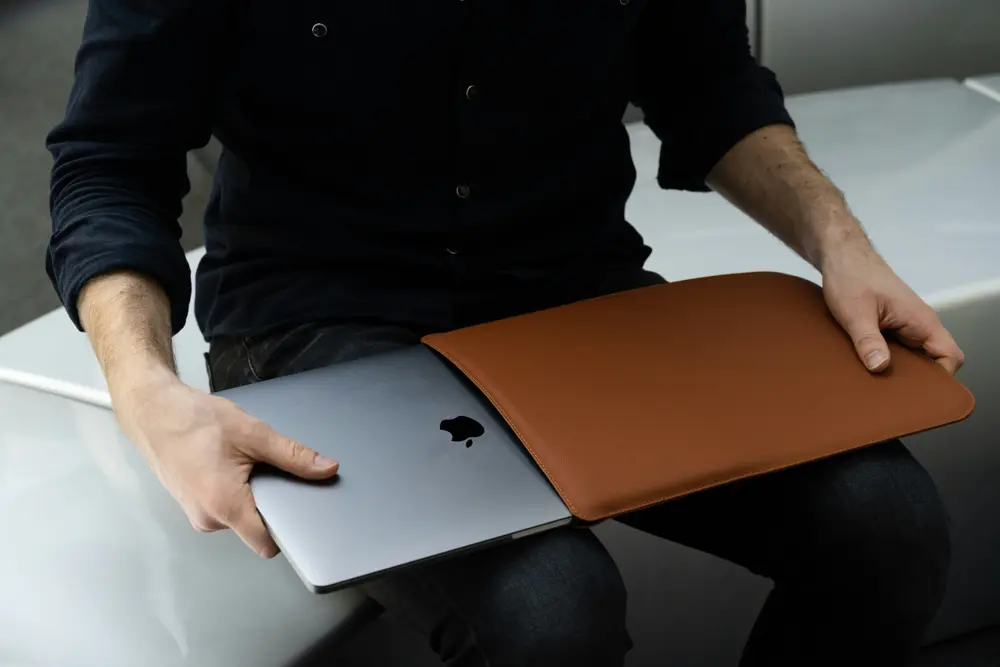
Where a laptop sleeve shines is inside another bag. Toss your sleeved laptop into a backpack or messenger bag and you’ve got scratch protection plus a bit of shock absorption, without the bulk of a dedicated laptop compartment. It’s also perfect for the minimalist carry: sleeve in hand, coffee in the other, walking into a meeting. No bulky bag required.
What it doesn’t do: protect the corners from hard impacts, keep out water (unless specifically waterproof), or provide any kind of theft deterrence. If you need drop protection, you want a hard-shell case or a padded laptop backpack. A laptop sleeve is one layer of a protection strategy, not the whole thing.
Laptop Sleeve Materials: What You’re Actually Buying
The material determines almost everything about a sleeve — how it feels, how it protects, how long it lasts, and how it looks. Here’s the honest breakdown.
Neoprene: The Classic
Neoprene is the wetsuit material, and it’s been the default laptop sleeve fabric for years. It’s stretchy, water-resistant, and provides decent cushioning. It conforms to your laptop’s shape, which gives a snug fit. The downside? It looks a bit sporty, it can make your laptop sweaty in heat (it doesn’t breathe), and cheap neoprene develops a funky smell over time. Still, for the price, a neoprene laptop sleeve is hard to beat for basic protection.
Leather and Faux Leather: The Professional Pick
A leather laptop sleeve looks fantastic walking into a boardroom. Real leather develops a patina, feels great, and lasts for years. Faux leather (PU leather) looks similar at a fraction of the price but won’t age as gracefully — it can peel after a year or two of heavy use. Leather sleeves tend to have less padding than neoprene, so you’re trading some shock absorption for style. If appearance matters for your work, this is your category.
Canvas and Fabric: The Casual Choice
Waxed canvas and heavy-duty fabrics (like ballistic nylon or Cordura) make for rugged, casual sleeves. They’re durable, often water-resistant, and develop character with use. Many have extra pockets for chargers and accessories, which neoprene sleeves usually lack. The tradeoff is bulk — fabric sleeves tend to be thicker and less form-fitting than neoprene.
Felt: The Minimalist Darling
Wool felt sleeves are thin, light, and surprisingly protective. They look clean and modern, come in nice colors, and add almost no bulk. But felt isn’t water-resistant, it can pill, and it offers the least padding of any material here. A felt laptop sleeve is about scratch protection and aesthetics, not impact absorption.
Getting the Fit Right: Size Matters More Than You Think
This is where most people go wrong. A laptop sleeve that’s too loose lets the laptop slide around inside, which defeats the purpose — it can actually cause more damage as the machine bangs against the sleeve’s edges. Too tight, and you’re wrestling it in and out, stressing the zipper and potentially scratching the laptop on the way in.
Sleeves are sold by screen size (13-inch, 15-inch, 16-inch), but screen size doesn’t tell the whole story. A 15-inch MacBook Pro and a 15-inch gaming laptop have very different dimensions — the gaming machine might be twice as thick. Always check the sleeve’s internal dimensions against your laptop’s actual measurements (length × width × thickness). Most manufacturers list both.
If you’re between sizes, size up slightly rather than down. A sleeve that’s a touch roomy with good padding is better than one you have to force. And if your laptop has a bulky case or skin on it, factor that thickness in — measure with the case on.
Padding and Protection: What’s Inside Counts
Not all padding is equal. The cheapest sleeves have a thin layer of foam that compresses to nothing within months. Better ones use memory foam, air-cell cushioning, or multi-layer construction that actually absorbs impact.
Look for sleeves with reinforced corners or edges. Drops and bumps almost always hit corners first, so extra padding there matters more than uniform thin padding everywhere. Some premium sleeves have a “suspension” design where the laptop sits in a hammock-like compartment that doesn’t touch the outer shell — that’s the gold standard for a soft case.
The interior lining matters too. A soft, non-abrasive lining (microfiber, plush, or smooth nylon) prevents the micro-scratches that accumulate from sliding the laptop in and out daily. Avoid sleeves with exposed zipper teeth on the inside — one careless insertion and you’ve got a scratch across the lid. Good sleeves have a zipper guard or recessed zipper track.
Laptop Sleeve Styles: Finding Your Match
The Basic Zip Sleeve
The standard: a padded pouch with a zipper on two or three sides. Simple, effective, affordable. This is what most people picture when they think “laptop sleeve,” and for good reason — it does the job with no fuss. Get one with a quality zipper (YKK is the benchmark) because a cheap zipper is the first thing to fail.
The Envelope/Fold-Over
No zipper — just a flap that folds over and secures with magnets or elastic. These look sleek and are fast to open, but they offer less dust protection and the laptop can slide out if you hold it upside down. Best for careful users who prioritize aesthetics and speed over maximum security.
The Sleeve with Handles or Strap
A hybrid between a sleeve and a briefcase. Handles or a shoulder strap let you carry the laptop on its own without a separate bag. Useful for the office-to-meeting shuffle, but the handles add bulk and the sleeve gets heavier. If you already carry a backpack, skip the handles.
The Organizer Sleeve
Extra pockets for charger, mouse, pens, phone, and documents. Turns the sleeve into a mini mobile office. The tradeoff is thickness — once you load the pockets, it’s no longer slim. Great for minimalists who want one grab-and-go item, less great if you wanted something sleek.
Water Resistance: How Much Do You Need?
Neoprene is naturally water-resistant — it’ll shrug off light rain and coffee splashes. Waxed canvas handles drizzle well. Leather resists water initially but needs conditioning to maintain it. Felt? Forget it — felt absorbs water like a sponge.
But “water-resistant” is not “waterproof.” No standard laptop sleeve will protect your machine if you drop it in a puddle or get caught in a downpour. If you commute by bike or walk in heavy rain regularly, either get a sleeve specifically marketed as waterproof (with sealed seams and waterproof zippers) or carry a separate rain cover. For most people, basic splash resistance is plenty.
What to Look for When Shopping
Here’s a practical checklist. Run through it before you buy any laptop sleeve:
First, verify the fit with actual dimensions, not just screen size. Second, check the zipper quality — it’s the most common failure point. Third, feel the padding (in person) or read reviews about it (online) — thin, cheap foam is worse than useless because it gives false confidence. Fourth, look at the interior — it should be soft and zipper teeth should be covered. Fifth, consider your use case: minimalist carry, inside a backpack, professional appearance, or maximum organization.
Price-wise, you don’t need to spend a fortune. A solid laptop sleeve runs from budget-friendly to mid-range. Above that, you’re paying for brand, premium leather, or designer aesthetics — which is fine if that’s what you want, but it doesn’t buy proportionally more protection. The sweet spot for most people is a well-reviewed sleeve from a reputable brand in the middle of the price range.
Read reviews from people with your exact laptop model. Fit issues are model-specific, and a sleeve that’s perfect for a MacBook Air might be too tight for a ThinkPad of the “same” screen size. Model-specific reviews are worth more than any product description.
Caring for Your Laptop Sleeve
A sleeve protects your laptop, but who protects the sleeve? Basic maintenance extends its life significantly.
For neoprene, wipe it down with a damp cloth and mild soap. Don’t machine wash it — the agitation breaks down the foam structure. Air dry completely before putting your laptop back in; trapped moisture is bad for both the sleeve and the computer.
Leather sleeves need occasional conditioning (every few months) to prevent drying and cracking. Use a leather conditioner, not just any oil. Keep leather away from prolonged direct sunlight, which fades and dries it.
Fabric and canvas sleeves can usually handle a gentle machine wash, but check the label — some have waterproof coatings that washing destroys. Felt should be spot-cleaned only; use a lint roller regularly to keep it looking sharp.
Regardless of material, empty the sleeve completely once a month and shake out the debris. Crumbs, sand, and grit accumulate inside and act like sandpaper on your laptop’s finish. A quick shake-out takes ten seconds and prevents a lot of micro-scratches.
Laptop Sleeve vs. Other Protection: Making the Call
How does a sleeve compare to the alternatives? A hard-shell case (the plastic snap-on kind) protects against dents and scratches while adding minimal bulk, but it stays on the laptop permanently and offers no padding against drops. A sleeve offers padding but no hard impact resistance. Many people use both: hard shell for always-on scratch protection, sleeve for transport padding.
A padded laptop backpack or messenger bag with a dedicated laptop compartment is the alternative to sleeve-plus-regular-bag. It’s one item instead of two, but you’re committed to that bag. A laptop sleeve gives you flexibility — use it with any bag, or carry it alone.
For maximum protection during travel, the layered approach wins: laptop in a sleeve, sleeve in a padded backpack, backpack handled reasonably. Each layer handles what it’s good at. No single product does everything.
Common Mistakes to Avoid
Buying by screen size alone — we’ve covered this, but it bears repeating because it’s the number one mistake. Measure your laptop.
Ignoring thickness. Ultrabooks and gaming laptops with the “same” screen size can differ by over an inch in thickness. A sleeve that fits a MacBook Air will not fit a mobile workstation.
Choosing style over function for rough use. That gorgeous felt sleeve is perfect for the office. It’s a terrible choice for a construction site or a backpacking trip. Match the sleeve to your actual life, not your aspirational one.
Forgetting about the charger. If you go minimalist with just a sleeve, where does the charger go? Either get an organizer sleeve with a charger pocket or accept that you’ll need a small pouch for accessories. There’s nothing worse than a beautifully protected laptop with a dead battery and no charger.
Not checking the return policy. Fit is personal and model-specific. Buy from somewhere with easy returns so you can test the fit with your actual laptop and send it back if it’s not right.
When to Replace Your Laptop Sleeve
A laptop sleeve doesn’t last forever, and a worn-out one gives you a false sense of security. The padding compresses, the zipper gets finicky, and the interior lining wears thin. Here’s how to tell it’s time for a new one.
The squeeze test: press the padding between your fingers. If it springs back, it’s still doing its job. If it stays compressed or feels paper-thin, the shock absorption is gone. This happens faster with cheap foam — sometimes within a year of daily use. Quality memory foam lasts longer, but nothing lasts forever.
Check the zipper. If it catches, separates behind the pull, or needs wiggling to close, replace the sleeve before it fails completely — a zipper that pops open in your bag is worse than no sleeve at all. Also inspect the interior lining for worn spots where the laptop’s edges have rubbed through to the padding or outer shell. Those worn spots are scratch risks.
Smell matters too, especially with neoprene. If washing doesn’t remove a persistent odor, the material is breaking down. And if the sleeve has stretched to the point where the laptop slides around loosely, the fit is compromised. A good laptop sleeve should hold the machine snugly every time, not just when it was new.
As a rule of thumb, a daily-use sleeve lasts two to three years. A quality leather one can go longer with care. Budget for replacement on that cycle — it’s a small price to keep protecting a laptop worth ten or twenty times more.
Laptop Sleeve FAQs
Can I use a laptop sleeve as my only bag? For light days, absolutely. A sleeve plus a small pouch for your charger and phone covers the essentials. But for days when you need documents, a water bottle, or extra gear, you’ll want a real bag with the sleeve inside it.
Do I need a sleeve if my backpack has a laptop compartment? It depends on the compartment. If it’s well-padded with a soft lining and a secure strap or pocket, you’re probably fine without one. But many “laptop compartments” are just a thin divider with no real padding — in that case, a sleeve adds meaningful protection.
Will a sleeve protect against drops? Only minor ones. A sleeve absorbs small bumps and prevents scratches, but a drop onto concrete from desk height will likely damage the laptop regardless of the sleeve. For drop protection, you need a hard case or a rugged backpack — or better yet, don’t drop it.
Should the sleeve be snug or roomy? Snug but not tight. You should be able to slide the laptop in and out without forcing it, but it shouldn’t rattle around inside. If you can shake the sleeve and feel the laptop moving, it’s too big.
Are expensive sleeves worth it? Up to a point. The jump from a bargain-bin sleeve to a mid-range one buys you real improvements in padding, zipper quality, and durability. The jump from mid-range to luxury mostly buys materials and brand prestige. For most people, the mid-range is the sweet spot.
The Bottom Line
A laptop sleeve is a simple product, but the details matter. Get the size right (measure, don’t guess), choose a material that fits your life, make sure the padding and zipper are quality, and maintain it occasionally. Do that, and a modest investment protects a machine worth many times more.
Your laptop goes everywhere with you — through airports, coffee shops, offices, and classrooms. A good laptop sleeve is the barrier between your expensive machine and the rough-and-tumble of daily life. It’s one of those purchases you make once, appreciate daily, and wonder why you waited so long. Pick well, and your laptop will thank you with years of scratch-free service.



One thought on “Laptop Sleeve- Your Ultimate Guide to Protection and Style”